📁 Client & Project Dashboards
Organize your scans, keep track of different accounts, and automate persistent performance history tracking.
💼 Managing Campaigns for Multiple Accounts
When scaling up consulting contracts or handling marketing profiles for multiple local businesses, switching back and forth between random standalone URLs causes messy record keeping.
The My Projects panel allows you to build dedicated profiles for individual clients. Selecting an active profile from your global toolbar automatically ties all subsequent keyword research data, gap analysis scorecards, and audit logs to that account for easy extraction later.
🕰️ Project History & Decision Ledger
Once a project is active, every scan you run, whether it's Keyword Analysis, AI Readiness (GEO), or AI Visibility etc, it is automatically logged into that project's history. This creates a centralized hub of all your SEO activities without needing to manually save spreadsheets to your desktop.
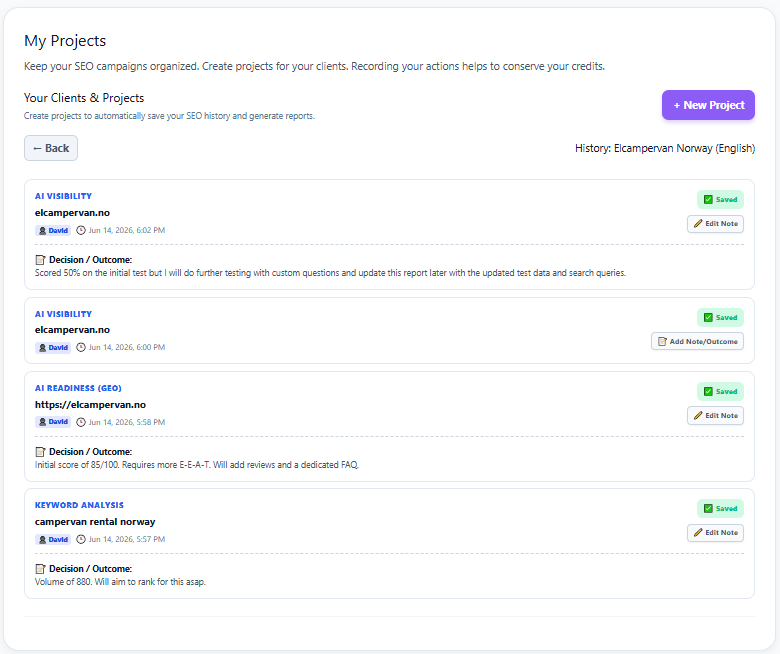
📝 The Strategic Decision Ledger
Data is only useful if you act on it. The built-in Decision / Outcome feature allows you to attach strategic notes directly to your historical scans to build a true timeline of your SEO campaigns.
-
🔎
Track Intent Note exactly why you pulled specific data (e.g., "Volume of 880. Will aim to rank for this asap.").
-
📈
Document Changes Record on-page updates (e.g., "Added reviews and a dedicated FAQ") so you can track correlation when your AI Readiness scores improve later.
-
🤝
Team & Client Alignment Keep a running log of decisions that the whole agency team can reference, making monthly client reporting effortless.