📡 B2B Lead Radar
Unmask anonymous website traffic and catch high-value corporate leads in real-time.
🎣 What is the B2B Radar?
Standard analytics tools tell you how many people visited your site. The RankAnvil B2B Radar tells you exactly who they are.
By installing a lightweight, invisible tracking pixel on a client's website, RankAnvil cross-references incoming visitor IPs against global corporate databases. It automatically filters out almost all standard consumer traffic (like home Wi-Fi networks) and only alerts you when a registered corporate entity browses your site.
🛠️ Installing the Tracking Pixel
To start catching leads securely, you must link your pixel to a specific project. Follow these steps to generate your code:
-
1.
Select your Active Project Use the "Active Project" dropdown at the very top of your screen. You must select the project you want to track so the system knows where to securely route the leads.
-
2.
Get the Code Click the </> Get Tracking Pixel button. RankAnvil will automatically generate a secure JavaScript snippet with your project name hardcoded into it.
-
3.
Paste on the Website Copy the code and paste it right before the closing
</head>tag of your client's website.

📊 Viewing & Filtering Your Leads
Once the pixel is live, the Radar will stay "quiet" until the very first corporate lead is captured. Click Refresh Feed to pull in new data from the server.
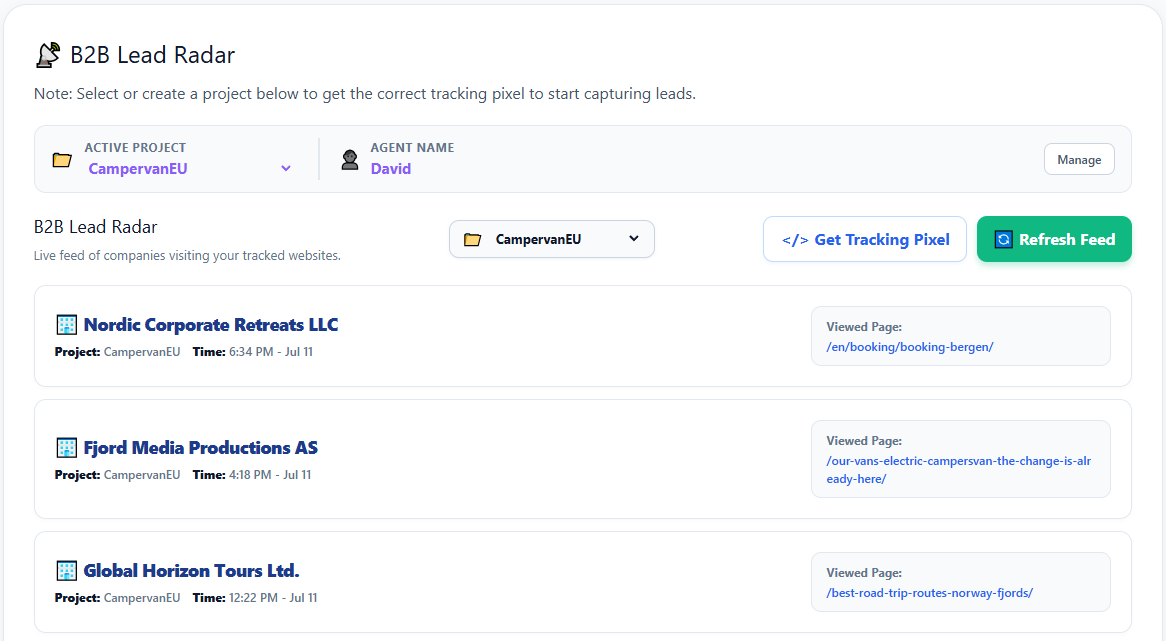
📁 Master List vs. Filter Dropdown
Notice that there are two dropdowns at the top of your B2B Radar screen:
- Active Project (Top Bar): This is your master list of all created projects. You use this to tell the system which project you are currently working on before generating a pixel.
- All Projects (Inside the Tool): This is a live filter. It only displays projects that have actively caught traffic. If a brand-new project hasn't caught a lead yet, it will intentionally not appear in this filter menu!